The Ultimate Guide to HOA Management Software for Self-Managed Boards in 2026
A complete, no-fluff guide to choosing HOA management software for self-managed boards in 2026: features, pricing, must-have integrations, and how to roll it out without overwhelming your volunteers.
NeibrPay Team
HOA Software Specialists
If you sit on a self managed HOA board, you already know the drill: chasing checks, juggling spreadsheets, copy-pasting late notices, and trying to remember whether the landscaper got paid. By 2026, the right HOA management software has gone from a "nice to have" to the single biggest lever volunteer boards have to save time, keep finances clean, and avoid the $250 to $400/unit/month price tag of a property management company.
This guide is written for the boards we serve every day at NeibrPay for communities under 150 units, with volunteer treasurers, no full-time staff, and zero appetite for enterprise software complexity. We'll walk you through what HOA software actually does, the features that matter for self managed boards, what fair pricing looks like, how AI is changing the day-to-day, and a 30 day rollout plan you can run without quitting your day job.
No fluff, no enterprise jargon, and no pretending your board is something it isn't. Let's get into it.
Why self managed HOAs need software in 2026
A decade ago, you could run a 30 unit HOA with a checkbook, a manila folder, and a free Wix site. In 2026, that's a recipe for burnout, lost money, and angry homeowners. Three things changed:
- Residents expect digital payments. Younger owners don't write checks. They want to pay dues from their phone over Zelle, ACH, or card the same way they pay Netflix.
- Banks treat HOA accounts as commercial. Your community operating account isn't a personal checking account. Hand-keying transactions into Excel is now the most expensive thing your treasurer does.
- Management companies have priced themselves out. For a 50-unit community, full management often costs $90,000 to $150,000 a year. Self management with the right software typically lands under $5,000 a year and the board keeps control.
The point of HOA management software for self managed boards isn't to replace your community's people skills. It's to take the boring, error-prone, midnight spreadsheet work off the volunteers who already have full-time jobs.
What HOA management software actually does
In plain English, HOA software is a single web app that handles four things for your community:
- Money in: billing residents and collecting dues, special assessments, late fees, and one off charges online.
- Money out: tracking vendor invoices, paying bills, recording reimbursements, and reconciling against the bank.
- Records: storing CC&Rs, meeting minutes, budgets, reserve studies, insurance docs, and any file the board needs in one place.
- Communication: sending announcements, handling violation notices, processing architectural requests, and giving each homeowner a portal to see what they owe and what's happening.
A good platform stitches all four together so a payment flows into your ledger, the bank reconciliation, the homeowner's portal balance, and the board's financial report automatically. You stop being the integration between systems.
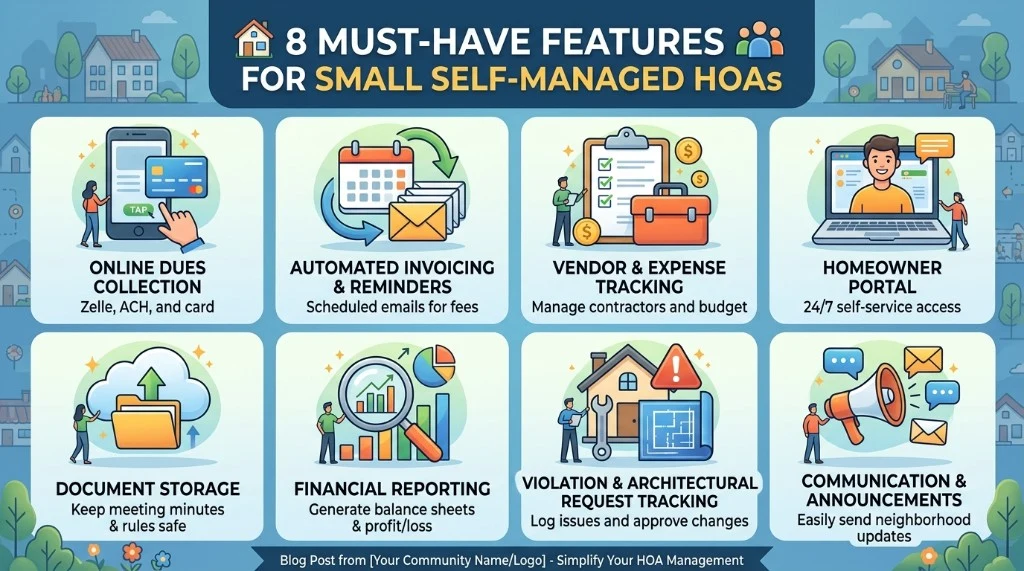
8 must-have features for small self managed HOAs
Most HOA software vendors list 50+ features on their pricing page. For a self managed board under 150 units, these are the eight that actually matter. If a tool is missing one of these, keep shopping.
1. Online dues collection (Zelle, ACH, and card)
The single highest ROI feature. Owners pay online, the system records the payment, and your treasurer's phone stops buzzing on the 30th of every month. Look for ACH support (the cheapest method) plus card and Zelle for owners who refuse to link a bank account.
2. Automated invoicing and reminders
Recurring monthly or quarterly invoices, late fees applied on schedule, and reminder emails that go out automatically at 7, 14, and 30 days overdue. Boards that automate reminders typically see late payments drop 40 to 60% in the first quarter.
3. Vendor and expense tracking
Every dollar leaving the operating account should be tied to a vendor and a category (landscaping, insurance, utilities, reserves). Bonus points if the system handles 1099 reporting and lets you upload receipts from your phone.
4. Homeowner portal
Each owner gets a login showing their balance, payment history, documents, announcements, and a way to submit maintenance or architectural requests. This is the feature residents notice and it's the one that makes the board look professional overnight.
5. Document storage
CC&Rs, bylaws, financials, meeting minutes, and reserve studies in a single, searchable library. The minimum bar: it has to outlast whichever board member set it up.
6. Financial reporting
Income statements, balance sheets, accounts receivable aging, and budget vs. actual reports your accountant won't laugh at. If the tool can't export to your CPA's format, it isn't HOA software.
7. Violation and architectural request tracking
Photo upload, status workflow (open → notice sent → resolved), audit trail, and templated letters. The goal is fairness and a paper trail not a debate about what someone said in a parking lot last August.
8. Communication and announcements
Email and (ideally) SMS announcements that go to all owners, specific buildings, or specific units. Newsletters, meeting reminders, parking alerts the stuff currently living in your treasurer's personal Gmail.
How much should HOA software cost? A realistic 2026 breakdown
Pricing in this industry is famously confusing. Here's how the four common pricing models actually compare for a typical 50 unit self managed HOA, before payment processing fees.
| Pricing model | Typical range | Annual cost (50 unit HOA) | Best for |
|---|---|---|---|
| Per-unit per-month | $1.00 to $3.00 / unit / mo | $600 to $1,800 | Mid sized communities |
| Flat monthly fee | $30 to $80 / mo | $360 to $960 | Predictable budgets, small HOAs |
| Annual subscription | $300 to $1,500 / yr | $300 to $1,500 | Boards that pay once and forget |
| "Free" with payment fees | $0 base + 2.9 to 3.5% on payments | ~$2,500+ in pass through fees | Almost no one owners or HOA pays it |
What you should actually budget for: $500 to $1,800 per year in software for a 30 to 100 unit self managed community, plus transaction fees on payments (ACH is typically a flat $0.50 to $2.50 per transaction; card is 2.9% + $0.30 and is usually passed back to the paying owner).
Compared to hiring a property management company, this is roughly 2 to 3% of what full management would cost. Even cheap management firms charge $10 to $25 per door per month before extras $6,000 to $15,000 per year for a 50 unit HOA, and you give up a chunk of decision-making power along with it.
Hidden costs to watch for
- Setup fees for "implementation" fair if you have 200+ units, a red flag if you're under 100.
- Per-user pricing for board seats never pay extra for additional treasurers or secretaries.
- Charges for ACH transactions over a tiny monthly cap read the fine print.
- Annual contracts that auto renew. Month-to-month is the new normal.
AI and automation the volunteer burnout cure
The big shift in 2025 to 2026 has been practical AI inside HOA software not chatbots that hallucinate, but assistants that do specific board tasks. The ones that actually save time:
- Auto-categorizing bank transactions against vendors and budget lines, so reconciliation goes from a Sunday afternoon to five minutes.
- Drafting letters and notices from templates and the owner's account history (violations, late payments, ARC approvals).
- Summarizing meeting minutes from an audio recording.
- Answering homeowner questions ("What's my balance?", "When is the next meeting?", "Can I add a fence?") via the resident portal using only your community's documents, not the open internet.
- Forecasting reserves based on your reserve study and actual spending.
The NeibrPay AI HOA Assistant is built for exactly this taking the rote work off volunteers without pretending to replace board judgment. Treat AI like a junior board assistant: great at drafts, terrible at decisions.

How to choose the right platform: a buyer's checklist
Before any sales call, run any tool you're evaluating through this checklist. If a vendor can't answer "yes" to most of these, you'll regret the contract within six months.
- Is it built for HOAs (not adapted from rental property management)?
- Does it support ACH, card, and at least one mobile-first method?
- Is the owner portal mobile-responsive without an app download?
- Can a non-accountant board member run a usable financial report?
- Are violations, ARC requests, and document storage included not upsells?
- Is there a real implementation guide for boards under 150 units?
- Can you export your data if you ever leave?
- Is pricing transparent and on the website (no "contact us")?
- Do they support self managed boards specifically?
- Is there an AI assistant that does real work, not marketing AI?
Top HOA software options for self managed boards in 2026
Here's an honest, high level comparison of the platforms self managed boards most often consider. We'll publish dedicated head to heads for each but this is the lay of the land for 2026.
| Platform | Best for | Strengths | Watch outs |
|---|---|---|---|
| NeibrPay | Self managed HOAs under 150 units | All in one, AI assistant, Zelle/ACH/card, transparent flat pricing | Newer brand than legacy vendors |
| PayHOA | Small boards focused on payments | Payments, document storage, decent UX | Limited financials and AI; per unit pricing adds up over 75 units |
| Buildium | Property managers with HOA portfolios | Mature platform, strong accounting | Built for management companies, overkill for volunteers |
| HOA Start / EasyHOA | Very small HOAs and condos | Cheap, simple | Minimal AI, weaker reporting and audit trails |
| Condo Control | Condos with concierge/security needs | Strong front desk and amenity tools | Heavier feature set than most small HOAs need |
| DoorLoop | Hybrid rental + HOA portfolios | Modern UI, strong leasing features | HOA specific workflows are second class |
The simple rule: if your HOA is self managed and under 150 units, lean toward tools designed for that exact shape (NeibrPay, PayHOA, smaller players). If you're a property manager with 500+ doors, Buildium or AppFolio are sized for you.
How to switch from spreadsheets, PayHOA, or another tool
The switching cost is what keeps most boards stuck. It's smaller than you think. Here's the order that works:
- Export what you have. Owner roster (name, address, unit, email), 12 months of dues history, open balances, vendor list, and YTD income/expense.
- Pick a "go-live" date at the start of a billing period first of the month or first of the quarter.
- Import the roster and balances into the new platform and have a board member spot-check 5 to 10 random units.
- Run one parallel month on both systems if you're nervous, but most small HOAs skip this.
- Send the announcement to owners with a one page "here's how to pay starting Month X" guide.
- Cut the old system loose after 60 days and archive a full export.
Your 30 day rollout plan
You don't need a project manager. You need a checklist and four Saturdays. Here's the plan we walk new NeibrPay communities through:
Week 1 set up
- Create the community, units, and board roles.
- Connect the operating bank account.
- Upload owner roster and last 12 months of dues activity.
- Configure the dues schedule (monthly/quarterly), late fees, and grace period.
Week 2 test
- Have one board member pay their own dues through the portal.
- Import vendors and last quarter's invoices.
- Run a trial financial report and compare it to your last close.
Week 3 announce
- Send the launch email to owners with a 90-second video or one-pager.
- Hold one optional 30 minute Zoom Q&A record it.
- Activate the homeowner portal.
Week 4 operate
- Run your first billing cycle.
- Reconcile the bank inside the platform.
- Send the first automated late payment reminder.
- Save 5 hours and call it a win.
Common mistakes self managed boards make (and how to avoid them)
- Buying for the wrong size. Choosing enterprise software because a 500 unit community uses it is the #1 reason boards give up after three months.
- Not enforcing online payments. If you keep accepting checks "for one or two owners," you're maintaining two payment systems. Set a sunset date.
- Treating reserves like a savings account. A reserve study and a forecasted reserve plan inside your software is the difference between a $200 special assessment and a $20,000 one.
- Letting one person hold all the logins. Every board role should be a seat in the platform with the right permissions not the treasurer's personal email and password on a sticky note.
- Skipping the homeowner portal rollout. If owners don't see the portal, they don't trust it. Ten minutes of email and a screenshot fixes this.
Why NeibrPay is built for boards like yours
We didn't start NeibrPay to chase 1,000 unit master planned communities. We built it because we saw the same pattern across hundreds of small self managed HOAs: spreadsheets duct taped to a payment portal, a treasurer doing 15 hours of unpaid work a week, and software that felt designed for property managers, not volunteer boards.
NeibrPay is opinionated about three things:
- Simplicity over feature counts. Every feature has to earn its place by reducing volunteer time.
- Transparent flat pricing. No per unit fees that punish you for growing, no upsells for "premium" support.
- An AI assistant that actually does work drafting notices, categorizing transactions, answering homeowner FAQs from your own documents.
If that sounds like the platform you wish you had two boards ago, that's the point.
Frequently asked questions
Is HOA management software worth it for a community under 30 units?
Yes usually more than for larger communities. Small HOAs typically have one volunteer doing everything. The software pays for itself the first time you avoid a missed late fee or a $200 bank reconciliation mistake.
Can a self managed HOA really avoid hiring a management company?
In 2026, absolutely provided you have 2 to 3 engaged board members, a modern platform, and a clear set of policies. Most self managed communities under 150 units run cleaner books than the property managers we audit.
Do owners need to download an app?
No. The good platforms including NeibrPay work in any mobile browser. Forcing residents to install an app is a great way to make sure they never log in.
How long does implementation actually take?
For a self managed HOA under 100 units with reasonably clean records: one Saturday for setup, one week of testing, and one billing cycle to go live. Faster if you don't try to perfect everything before launch.
What about state-specific HOA compliance?
Software handles the records, the audit trail, and the documentation every state requires. State specific rules (like California's Davis Stirling or Florida's 720) are about policy, not software. Your platform should make compliance easier, not promise to replace your CC&Rs.
Can we keep our current bank?
Yes. NeibrPay and most modern platforms connect to your existing operating account through Plaid and route ACH payments through compliant rails like Stripe. You don't switch banks you finally use the one you have.
The bottom line
The best HOA management software for a self managed board in 2026 isn't the one with the most features. It's the one that fits the size, budget, and tolerance for complexity of a volunteer board and then gets out of the way.
Pick a platform built for self managed HOAs. Insist on online dues, a real owner portal, transparent pricing, and AI that does work instead of demos. Set a 30 day rollout plan. Stop being the integration between five tools.
Your community will run more smoothly, your treasurer will get their Sundays back, and the next board will inherit a system instead of a shoebox.