The Ultimate Guide to Texas HOA Management Software for Self-Managed Boards in 2026
A no-fluff guide to Texas HOA management software for self-managed boards in 2026: Chapter 209 compliance, §209.0062 payment plans, management certificates, fair pricing, and a 30-day rollout plan.
NeibrPay Team
HOA Software Specialists
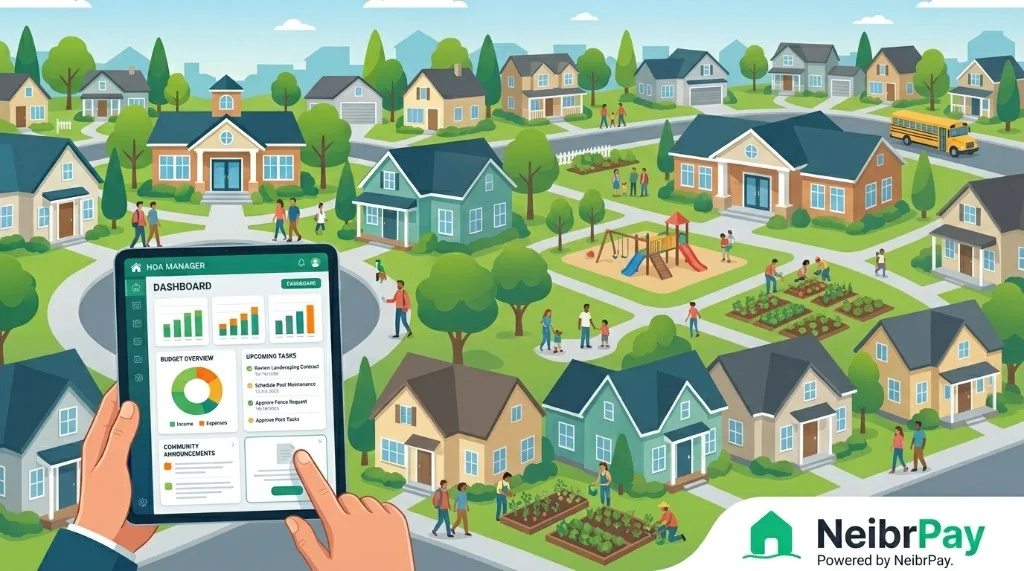
Texas HOA boards work under the Texas Residential Property Owners Protection Act (Property Code Chapter 209), the Uniform Condominium Act (Chapter 82), and homeowner-friendly reforms that have steadily tightened what boards can do without notice. By 2026, the right Texas HOA management software is less about going digital and more about keeping a board out of trouble: the difference between a clean Section 209.0062 payment plan and a foreclosure attorney on the phone.
This guide is written for the volunteer Texas boards we serve every day at NeibrPay for communities under 150 doors from Austin to El Paso, treasurers who don't have time to learn AppFolio, and budgets that can't carry RealManage at $20 a door. We'll walk through what Texas HOA software actually needs to do in 2026, the Chapter 209 obligations it has to support, fair pricing in a fast-growing-but-thrifty state, how AI is rewriting the day-to-day, and a 30-day rollout plan that fits between summer HOA meetings and Christmas-in-July dues mailers.
No fluff, no enterprise jargon, and no pretending your Frisco board has the same problems as a 4,000-unit Houston master association. Let's get into it.
Why self-managed Texas HOAs need software in 2026
Texas communities are different. Three forces have made spreadsheet management untenable here:
- Chapter 209 payment plan rights. Owners can request a payment plan of at least three months on delinquent assessments (§209.0062). Boards have to track them. Excel doesn't.
- Foreclosure notice and judicial process. Non-judicial foreclosure for HOA assessment liens has been narrowed; expedited judicial foreclosure (Rule 736) is the path for most. Every notice, every certified-mail receipt, every owner response, has to be in one place.
- Fast-growing communities, fast-arriving residents. Texas is the #1 state for inbound moves. New owners, many from California or the Northeast, expect a digital portal from day one. They will not write your treasurer a check.
The point of HOA management software for self-managed Texas boards isn't to replace your community's people skills. It's to take the Chapter 209 paperwork and dues collection off volunteers who already have full-time jobs and a long Texas summer to survive.
What HOA management software actually does for Texas boards
- Money in: billing residents and collecting regular assessments, special assessments, late fees, and one-off charges online.
- Money out: tracking vendor invoices, paying bills, recording reimbursements, and reconciling the bank.
- Records: storing the recorded declaration, bylaws, dedicatory instruments (which Texas requires you to file in county records), reserve studies, insurance, and minutes, the documents §209.005 obligates you to make available.
- Communication: assessment notices, hearing notices, ARC requests, weather alerts, and an owner portal so nobody can claim "I never received the certified letter."
- Compliance: the audit trail Texas boards need, notice timestamps, payment plan records, hearing transcripts, annual budget delivery, so a Chapter 209 dispute doesn't turn into a Rule 736 hearing.
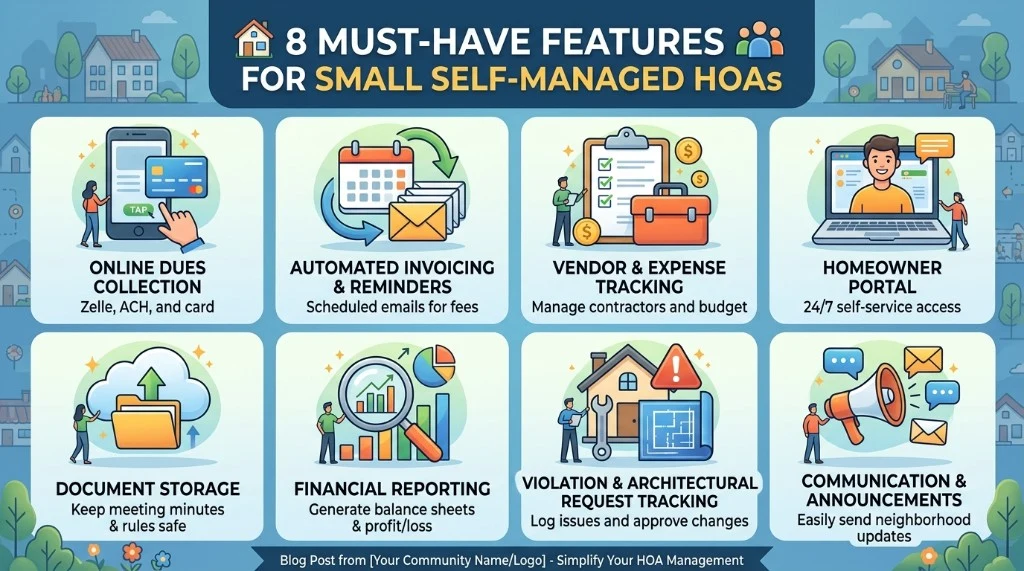
8 must-have features for Texas self-managed HOAs
1. Online dues collection (ACH and card)
Texas owners, especially in DFW, Austin, and Houston metros, pay from a phone. ACH is non-negotiable for monthly assessments. Card handles the late-paying owner who finally pays in November. Look for the ability to apply a single payment across multiple line items.
2. Payment plans built into the ledger (§209.0062)
The platform must let you offer a payment plan of at least three months, with interim balances visible in the owner portal, no additional late fees on installments paid on time, and an audit trail of the offer and the response.
3. Vendor and expense tracking with 1099 support
Texas boards write a lot of vendor checks, landscapers, pool contractors, pest control, irrigation. Every dollar tied to a vendor and a category, with receipts attached and year-end 1099-NEC reporting included. Bonus points for paying vendors via ACH from the platform.
4. Texas-friendly homeowner portal
Each owner gets a login showing balance, payment history, recorded governing documents, the latest financial, and a way to submit ARC requests. New Texas residents arriving from out of state expect this.
5. Document storage with §209.005 records-request tagging
§209.005 obligates you to make books and records available with 10 business days' notice. Tagged document storage, declaration, bylaws, dedicatory instruments, financials, minutes, turns the request into a one-click response.
6. Texas-grade financial reporting
Income statements, balance sheets, accounts receivable aging, and budget vs. actual. If your bylaws or governing docs require an annual audit or review, the software should hand off cleanly to a Texas CPA.
7. Violations, hearings, and ARC tracking
§209.006 and §209.007 require notice of violation and an opportunity to be heard before assessing certain fines. Photo upload, status workflow, audit log, and templated letters, defensible enforcement that holds up in front of a justice of the peace.
8. Mass communication and severe-weather alerts
Email and SMS announcements with delivery timestamps. For Texas, severe-weather alerts (winter storms, derechos, hail) are a real board responsibility, and they have to go fast.
How much should Texas HOA software cost? A realistic 2026 breakdown
| Pricing model | Typical range | Annual cost (50-unit TX HOA) | Best for |
|---|---|---|---|
| Per-unit per-month | $1.00 – $3.00 / unit / mo | $600 – $1,800 | Mid-sized TX communities |
| Flat monthly fee | $30 – $80 / mo | $360 – $960 | Small TX HOAs, predictable budgets |
| Annual subscription | $300 – $1,500 / yr | $300 – $1,500 | Boards that pay once and forget |
| "Free" with payment fees | $0 base + 2.9–3.5% on payments | ~$2,500+ in pass-through fees | Almost no one, owners or HOA pays it |
What you should actually budget for in Texas: $500–$1,800 per year in software for a 30–100 unit community, plus transaction fees on payments.
Compared to hiring a Texas property management company, this is roughly 2–4% of what full management would cost. Texas management firms typically run $12–$22 per door per month, that's $7,200–$13,200 per year for a 50-unit HOA, plus per-letter certified mail charges and Rule 736 attorney coordination.
Texas-specific hidden costs to watch for
- Setup fees billed as "Texas configuration", fair if you have 200+ units, a red flag if you're under 100.
- Per-user pricing for board seats, never pay extra for a five-person board.
- Charges for ACH transactions over a tiny monthly cap.
- Annual contracts that auto-renew at the start of the fiscal year.
Texas compliance: what your software has to support
- §209.0062 payment plans. At least three months, offered before foreclosure or further enforcement. The software must track the plan and apply payments correctly without piling on late fees that aren't allowed.
- §209.005 records inspection. 10 business days from a written request. Tagged document storage is non-negotiable.
- §209.006 / §209.007 notice and hearing. Written notice, opportunity to cure, and (for some fines) a hearing, timestamped and document-linked.
- §202.018 / §202.0181 management certificates. Each association has to file a management certificate with the county and TREC. The software should remind you when it needs updating (e.g., new board members, new mailing address).
- §209.009 foreclosure prerequisites. Notice of delinquency, opportunity to cure, payment plan offer, all documented before a Rule 736 expedited foreclosure can proceed.
- §82.114 condo records (Ch. 82). If you're a condominium, additional record-keeping rules apply, the software should treat condo and HOA structures distinctly.
- Annual budget and disclosures. Many Texas governing documents require annual budget delivery to owners; the software should generate, send, and timestamp.
AI and automation: the volunteer burnout cure
- Auto-categorizing bank transactions, five minutes instead of a Saturday.
- Drafting Chapter 209-style letters from templates and the owner's account history.
- Summarizing meeting minutes from an audio recording.
- Answering homeowner questions via the resident portal, using only your community's documents.
- Forecasting reserves based on your reserve study and actual spending.
The NeibrPay AI HOA Assistant is built for exactly this. Treat AI like a junior board assistant: great at drafts, terrible at decisions.

How to choose the right platform: a Texas buyer's checklist
- Is it built for HOAs (not adapted from rental property management)?
- Does it support ACH and card natively?
- Can it run a §209.0062 payment plan with proper ledger handling?
- Can a non-accountant board member run a usable financial report?
- Does the document library tag governing docs for §209.005 requests?
- Does it track management certificate renewals?
- Is the owner portal mobile-responsive without an app download?
- Is pricing transparent and on the website (no "contact us")?
- Is there an AI assistant that does real work, not marketing AI?
Top HOA software options for Texas self-managed boards in 2026
| Platform | Best for | Strengths | Watch-outs |
|---|---|---|---|
| NeibrPay | TX self-managed HOAs under 150 units | All-in-one, AI assistant, ACH/card, payment plans, transparent flat pricing | Newer brand than legacy TX vendors |
| PayHOA | Small TX boards focused on dues | Payments, document storage, decent UX | Limited reserve and reporting; per-unit pricing adds up |
| RealManage / Vantaca | TX property managers with portfolios | Mature platform, deep accounting | Built for management companies, overkill for volunteers |
| AppFolio | Hybrid rental + HOA portfolios in TX | Strong accounting | HOA-specific TX workflows are second-class |
| Buildium | Property managers, smaller TX portfolios | Decent UX, broad market | Built for management companies |
| HOA Start / EasyHOA | Very small TX HOAs | Cheap, simple | Minimal reserve and audit-trail features |
The simple rule: if your Texas HOA is self-managed and under 150 units, lean toward tools designed for that exact shape. If you're a property manager with 500+ doors across multiple associations, RealManage or AppFolio are sized for you.
How to switch from spreadsheets, PayHOA, or another tool
- Export what you have. Owner roster, 12 months of assessment history, open balances, vendor list, YTD income/expense, and any active payment plans.
- Pick a "go-live" date at the start of a fiscal period, January 1 or the start of your fiscal year is easiest.
- Import the roster, balances, and payment plans and have a board member spot-check 5–10 random units.
- Run one parallel month if you're nervous, but most small TX HOAs skip this.
- Send the announcement with a one-page "here's how to pay starting Month X" guide.
- Cut the old system loose after 60 days and archive a full export.
Your 30-day Texas rollout plan
Week 1, Set up
- Create the community, units, and board roles.
- Connect the operating bank account.
- Upload owner roster and last 12 months of assessment activity.
- Configure assessment schedule, late fees, and grace period.
- Import any active §209.0062 payment plans.
Week 2, Test
- Have one board member pay their own assessment through the portal.
- Import vendors and last quarter's invoices.
- Run a trial financial report and compare to your last close.
- Upload declaration, bylaws, dedicatory instruments, and latest financial.
Week 3, Announce
- Send the launch email to owners with a 90-second video.
- Hold one optional 30-minute Zoom Q&A, record it.
- Activate the homeowner portal.
Week 4, Operate
- Run your first billing cycle.
- Reconcile the bank inside the platform.
- Send the first automated late-payment reminder.
- Save 5 hours and call it a win.
Common mistakes Texas self-managed boards make
- Buying for the wrong size. Choosing enterprise software because a 4,000-unit Houston community uses it is the #1 reason small TX boards give up after three months.
- Not enforcing online payments. Set a sunset date for paper checks.
- Skipping payment plans. §209.0062 payment plan rights are mandatory, don't try to foreclose around them.
- Letting one person hold all the logins. Every board role should be a seat with the right permissions.
- Skipping the homeowner portal rollout. Texas's growing population of new residents expects digital, it's table stakes.
Why NeibrPay is built for Texas boards like yours
We didn't start NeibrPay to chase 4,000-unit master-planned communities. We built it because we kept seeing the same pattern across hundreds of small Texas self-managed HOAs: spreadsheets duct-taped to Zelle, a treasurer doing 15 hours of unpaid work a week, and software that felt designed for property managers, not volunteer boards trying to comply with Chapter 209.
NeibrPay is opinionated about three things:
- Simplicity over feature counts.
- Transparent flat pricing.
- An AI assistant that actually does work.
Frequently asked questions, Texas boards
Is HOA software worth it for a small Texas community under 30 units?
Yes, usually more than for larger communities. The §209.005 records-request rules apply to small associations the same as to large ones. The software pays for itself the first time you avoid a missed late fee or a §209.006 notice that wasn't sent properly.
Does the software handle Texas §209.0062 payment plans?
A modern platform should let you offer a 3+ month plan, track the installments separately from regular dues, suppress additional late fees on installments paid on time, and keep the audit trail.
Can a self-managed HOA in Texas really avoid hiring a management company?
In most cases for communities under 150 units, yes, provided you have 2–3 engaged board members and modern software. Most self-managed Texas communities under 150 units run cleaner books than the property managers we audit.
Do owners need to download an app?
No. The good platforms, including NeibrPay, work in any mobile browser. Forcing residents to install an app is a great way to make sure they never log in.
How does the software handle Texas management certificates?
The platform should track when your management certificate was filed, when it expires, and remind you when board changes require an update with the county and TREC.
Can we keep our current bank?
Yes. NeibrPay and most modern platforms connect to your existing operating account through Plaid and route ACH payments through compliant rails like Stripe. You don't switch banks.
The bottom line
The best HOA management software for a Texas self-managed board in 2026 isn't the one with the most features. It's the one that fits the size, budget, and Chapter 209 reality of a volunteer board, and then gets out of the way.
Pick a platform built for self-managed Texas HOAs. Insist on online dues, a real owner portal, payment-plan handling, transparent pricing, and AI that does work instead of demos. Set a 30-day rollout plan. Stop being the integration between five tools.